



Frequently Asked Questions | |
| Do I need an account? | Nope! Island Hopper is open to everyone, with no account or sign-up needed. Just pick your route and sailing date on the main page and you're off. |
| How does this work? | Island Hopper takes reservation requests for sold-out ferries and regularly checks for availability. If it finds availability on a ferry you want, it books it for you. Simple as that. |
| What will I be charged? |
Island Hopper charges an initial Job Creation Fee of $5.00 to place a job in the Island Hopper queue.
Then, only if Island Hopper is successful at securing your reservation, you will be charged an Island Hopper Successful Booking Fee of $10.00. Lastly, you will be charged for the cost of the actual reservation by BC Ferries or by Island Hopper, depending on the credit card used (see the next question in the FAQ). |
| Does Island Hopper use my credit card to book the actual reservation with BC Ferries? | Due to increased security measures on the BC Ferries site, some credit cards may fail on Island Hopper. In this situation, an Island Hopper credit card is used instead to secure the reservation, and the fees are passed on to your card through Island Hopper's payment processing. This means you will see two charges from Island Hopper on your credit card statement after booking. |
| Is my credit card information safe? | Island Hopper uses HTTPS protocols for Security (minimum TLS is version 1.2) and additionally strongly encrypts all of your personal information when you start a job. Your information is only stored for the duration of the job and is purged nightly after jobs complete (successful or not). |
| Why does Island Hopper ask for my BC Ferries login on some bookings? | For larger prepaid fares, Island Hopper completes the booking on your own BC Ferries account, so the fare is charged directly to your saved card by BC Ferries — Island Hopper only ever adds its own service fee. Smaller $20 reservation fees don't need this, so no BC Ferries login is required for those. |
| Is it safe to give Island Hopper my BC Ferries login? | Yes. Your BC Ferries login is strongly encrypted, stored only for the duration of your job, and purged nightly after the job completes — the same way Island Hopper handles all of your personal information. You choose a card already saved on your BC Ferries account, so Island Hopper never sees or stores your full card number. Prefer not to? Smaller reservation fees can still be booked without a BC Ferries login. |
| I don't have a saved card on my BC Ferries account — how do I add one? | Sign in at bcferries.com, open your account's saved payment methods (wallet), and add a card. Then come back to Island Hopper, turn on the BC Ferries Account option, validate your login, and select that card. |
| Island Hopper successfully secured me a reservation but the reservation is only for 1 adult, but I'm travelling with 2 more adults, 3 kids and a dog. Am I going to have troubles with my reservation? |
To take a step back, Island Hopper does support the booking of a reservation with multiple adults, children, infants and BC seniors which is done via the nifty Booking Options button on the main Island Hopper webpage.
The information that you specify in the Booking Options panel (number of passengers, vehicle length/height) is used by Island Hopper when it books the reservation with ferries in BC on your behalf. 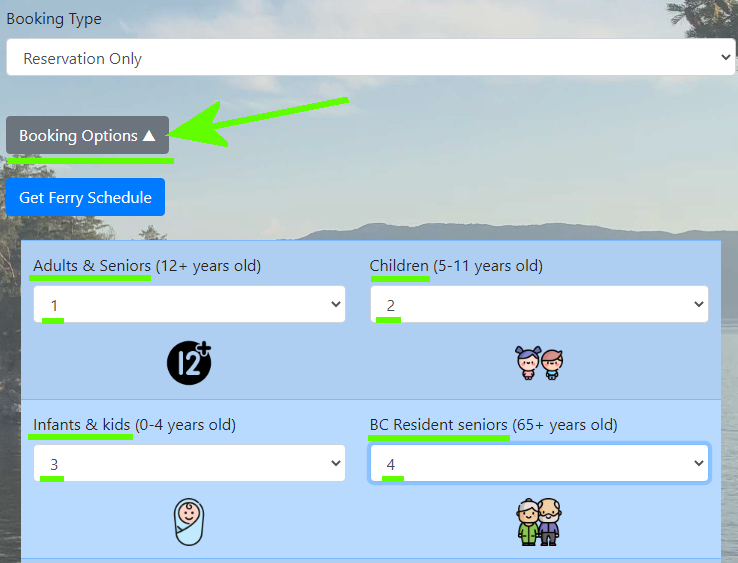
However, if you forgot to do that or if the number of passengers has changed, don't sweat it! Ferries will still honour your reservation and will do the math at the gate to charge you the correct amount for the number of adults, children, infants and BC seniors travelling in the vehicle; Fido will make the sailing too as pets travel free. |
| If I put in multiple sailing time requests for my Island Hopper job, am I going to get dinged with a bunch of reservations? | No, Island Hopper will only secure a single ferry reservation per job. In the event that multiple sailing times become available all at once, Island Hopper will book based on the priority order that you specify with 1 being your highest priority (e.g. your most desired sailing time). |
| I booked a reservation via Island Hopper but unfortunately my plans changed, and I need to cancel or change my reservation with ferries in BC. Is this possible? | Kinda...
You can sell your reservation at face value via these Facebook groups:
Alternatively, you can cancel your reservation with BC Ferries by clicking on the "View or edit your booking" button in your official email from BC Ferries but they do not refund any of your money when you cancel (e.g. you lose out on the $20 reservation fee). Another option is to change your reservation using the "View or edit your booking" button to a sailing date in the future (e.g. perhaps a long weekend in a few month's time) but changing your reservation is subject to a $5 change fee from BC Ferries. |
| Who can I contact with issues? | Island Hopper is run by a small, local team that makes every effort to provide support when issues arise. If you encounter an issue, please contact us. |